An AI voiceover can make a product video easier to revise, but a synthetic voice is not the strategy. Buyers need to understand what the product does, see credible proof, and hear claims that match what appears on screen. This guide shows how to script, source, edit, caption, and review narration for product videos without confusing fast generation with a finished campaign.
We will also be precise about Dika Studio’s role. You can record a microphone track, import a licensed AI-generated audio file, arrange it against footage in the browser editor, mix sound, generate subtitles, and export MP4. We do not present a dedicated built-in text-to-speech voice generator as a current feature. That distinction matters when choosing a production workflow.
What an AI voiceover can and cannot do
An AI voiceover is speech synthesized from a written script or generated from a recorded voice under a licensed, consent-based workflow. It can shorten production when a product team needs several language, pace, or copy variations. It cannot determine whether a product claim is true, pronounce a brand correctly by default, or decide where a pause helps the viewer understand a demonstration. Those remain editorial jobs.
Before choosing a voice tool, decide whether synthetic narration is appropriate for this campaign. A founder explaining a personal experience may gain more trust from an imperfect real recording. A routine feature walkthrough may benefit from a controlled voice that can be revised when the interface changes. Do not imitate a real person’s voice without permission. Keep a record of the provider, voice licence, script version, and any required disclosure. A voice that sounds plausible is not evidence of consent.
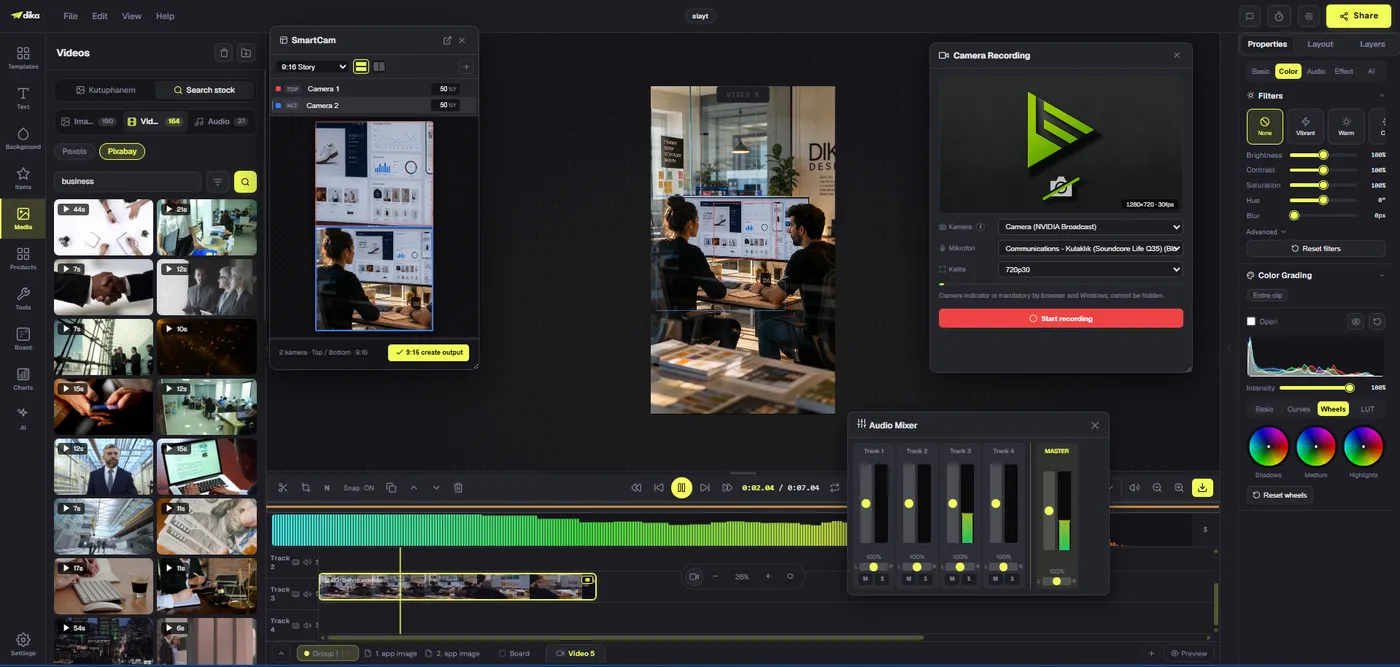
Dika Studio currently gives you a browser video timeline, microphone recording, per-track audio controls, AI denoise, subtitle generation, and MP4 export. A dedicated text-to-speech voice generator is not something we can promise as a built-in feature today. If you generate a licensed AI voiceover elsewhere, import that audio into Studio and edit it against the product footage. Or record your own voice directly in the media panel. The workflow is the same after the audio is on the timeline: align, mix, caption, review, and export.
Start with proof, not a voice preset
A product video should answer one question: what can this product do for this viewer, and how can they verify it? Write a one-sentence outcome before the script. For an inventory app, that might be “show a manager finding an out-of-stock item before a customer order fails.” For a physical product, it might be “show the lid sealing after repeated use.” The visual proof determines what the voice needs to explain. Starting with a voice preset often produces a polished narration attached to generic footage.
List every claim in the intended voiceover. Mark each as observable in the video, supportable through a source, or requiring qualification. “See your stock levels in one place” may be visible on screen. “Save five hours every week” needs defensible evidence and context. If a claim cannot be supported, rewrite or remove it before you generate or record audio. This review is cheaper before the edit than after subtitles, graphics, and localized variants depend on the line.
Decide the destination and length. A social-feed product teaser needs a faster route to proof than an onboarding walkthrough. Estimate speaking time by reading the script aloud at a natural pace. Leave space for the viewer to see the interface. If every second is filled with speech, there is no time to inspect the product action. The voiceover should direct attention, not narrate every click that the picture already explains.
Write a script that can survive editing
Build a script in short beats: opening problem, product action, proof, objection, and next step. One beat should usually align with one visual decision. Avoid a paragraph that depends on five unrelated screenshots. Write the visible action in a second column beside the spoken line. That makes mismatches obvious: if the narrator says “select the template” while the screen shows an export dialog, either the clip or the line must move.
Use conversational syntax, not brochure syntax. Short sentences are easier to pronounce, subtitle, and re-record. Expand abbreviations that a synthetic voice may misread; supply pronunciation notes for product names, acronyms, and uncommon surnames. Write numbers as the audience should hear them when precision matters. “Twenty-four seven” and “two-four-seven” may sound different, and a price needs careful context. Test the line in the target accent rather than assuming one English pronunciation works globally.
Read the script without looking at the visuals. If the spoken message is confusing, the edit will not rescue it. Then watch the visuals silently. If the product proof is absent, voiceover polish will not rescue that either. An effective production brief contains both the spoken line and the image that makes it credible. Keep legal and product reviewers close to this stage, because they can often prevent the most expensive late revisions.
| Beat | Voiceover job | Visual proof | Review risk |
|---|---|---|---|
| Hook | Name a relevant problem | Show the task or pain point | Exaggerated claim |
| Action | Guide attention | Real interface or product use | Outdated screen |
| Proof | State a supportable result | Observable outcome | Unverified metric |
| Objection | Clarify a limitation | Relevant detail | Missing qualification |
| Next step | Offer a clear action | Destination or final frame | Wrong URL or offer |
Choose a voice with rights and audience fit
If you use an external AI voice provider, compare voices in the context of the full script, not a five-word demo. Listen for pronunciation, breath patterns, stressed syllables, and emotional mismatch. A dramatic trailer voice can make a routine software demo feel less credible. A soft reading can disappear under energetic footage. The best voice is one the viewer can understand and trust at normal playback speed.
Check licensing before export. A free demo voice may be restricted for commercial use. Some services grant broad use while limiting voice cloning, redistribution, or model training. Keep the licence terms and consent record with campaign assets. For a cloned or custom voice, written permission should cover the intended channels, territories, and duration. Do not rely on a teammate’s casual approval in chat for a long-running paid campaign. If the script quotes a customer, obtain permission for that quote separately.
Generate a short sample containing difficult product terms. Test it with the target audience or a native speaker where language nuance matters. If the provider repeatedly mishandles a name, phonetic spelling, SSML controls, or a human recording may be more reliable than dozens of regenerated takes. Keep the output as a clean audio file with a descriptive name, such as product-feature-voice-en-v02, and record the exact script it represents.
Record a human voice when authenticity wins
AI voiceovers are an option, not a mandatory step. A real product expert may be more persuasive when the story needs accountability or a specific point of view. Dika Studio’s media panel can capture microphone audio in the browser. With the video editor open, the recording can be placed on the current track; otherwise you can pull it from the media library. Check browser permissions and microphone input before a full take. Record ten seconds, play them back, and fix room echo or clipping first.
Use a quiet space, consistent mic distance, and a short script broken into manageable sections. Leave a second of silence before and after each take so trims do not cut into words. If you make a mistake, pause and restart the sentence; do not force an awkward continuation to save a few seconds. A clean take is easier to edit than a perfect-sounding voice with unclear emphasis. Dika’s AI denoise can help with background noise, but listen to the result rather than assuming processing improves every recording.
Some teams benefit from a hybrid approach. Record the founder’s opening and use a licensed synthetic voice for repetitive UI steps, or use AI drafts to test timing before recording a final human track. If you mix voices, make the transition intentional. A sudden unexplained change can sound like an editing error. Keep the original source files so the team can correct a phrase without rebuilding the entire video.
Bring narration into the video timeline
Import the voice file alongside product footage, screenshots, and music. Keep voice, music, effects, and picture on separate tracks where possible. Dika Studio’s browser timeline supports trimming, splitting, moving clips, and multitrack arrangement. Put the spoken proof beside the corresponding product action, then play the sequence at normal speed. Avoid timing the cut solely from a waveform. The viewer needs a moment to look where the line asks them to look.
Start with a rough visual cut, then move the narration into place. Trim long breaths or dead space without removing natural cadence. If the voice runs too long, edit the script before speeding it up. Extreme time stretching can make even good narration hard to follow. If the picture finishes before the sentence, extend the shot only when it remains informative; otherwise add a relevant close-up or divide the spoken thought. Do not fill the gap with an unrelated stock scene.
When a product screen changes during production, replace the affected footage and revisit the corresponding line. A voiceover recorded for an older menu may become misleading after a UI release. Keep a shot-to-script map in the campaign brief so revisions can be scoped. Dika Studio lets you adjust clips on the timeline, but the team still needs a decision about which product build the video represents.
Mix for intelligibility, not loudness alone
Speech should remain understandable on a phone speaker at moderate volume. Use the audio mixer to adjust per-track levels and the master bus. Dika Studio also offers pan, mute, solo, and audio presets. Begin with clean narration, then bring music up underneath it. Mute the music periodically to check whether the voice itself is clear. If the mix only works at high volume, the balance may be wrong. Listen through the actual exported file, not only the editor preview.
Watch transitions between voice segments. Multiple synthetic generations can have different noise floors, loudness, and tonal color. A human pickup recorded on another day can sound equally discontinuous. Use consistent processing and compare adjacent lines while the picture is playing. Do not flatten every pause or breath; natural rhythm helps viewers process a new concept. A product demo with constant uninterrupted speech may feel efficient to the editor but exhausting to the buyer.
Do not rely on music to create trust. Music can support pacing, but it can also mask pronunciation errors and make legal qualifiers harder to hear. Verify rights for the track and check the platform’s audio rules. Create a voice-only review version if necessary. That makes it easier for a reviewer to catch a wrong price, metric, or instruction without distraction.
Make subtitles from the final spoken track
Captions are a separate quality pass. Dika Studio can generate timed subtitles from selected clip audio using on-device speech recognition, and it can import SRT or VTT. Generate captions after the voiceover wording and timing are stable. Otherwise every revised line creates a caption correction. Review product names, numbers, acronyms, offer terms, and punctuation by listening against the picture. Automatic speech recognition can be helpful and still be wrong where accuracy matters most.
Keep captions legible inside the destination’s safe area. A vertical clip may have platform controls over the lower portion. The same subtitle placement that works in a 16:9 website video may cover a product demonstration in a social feed. Test the export on a phone. Dika’s active subtitle track renders into the video frame; muting it allows a caption-free output. Name the versions clearly so no one uploads the wrong one.
Subtitles should not become a substitute for visual proof. A line reading “one-click setup” cannot make a complicated process true. If a claim appears in the voiceover, captions, and on-screen graphic, all three layers need the same correction when the claim changes. Use a single approved source of copy and perform a final cross-check before export.
When a talking presenter needs synced speech
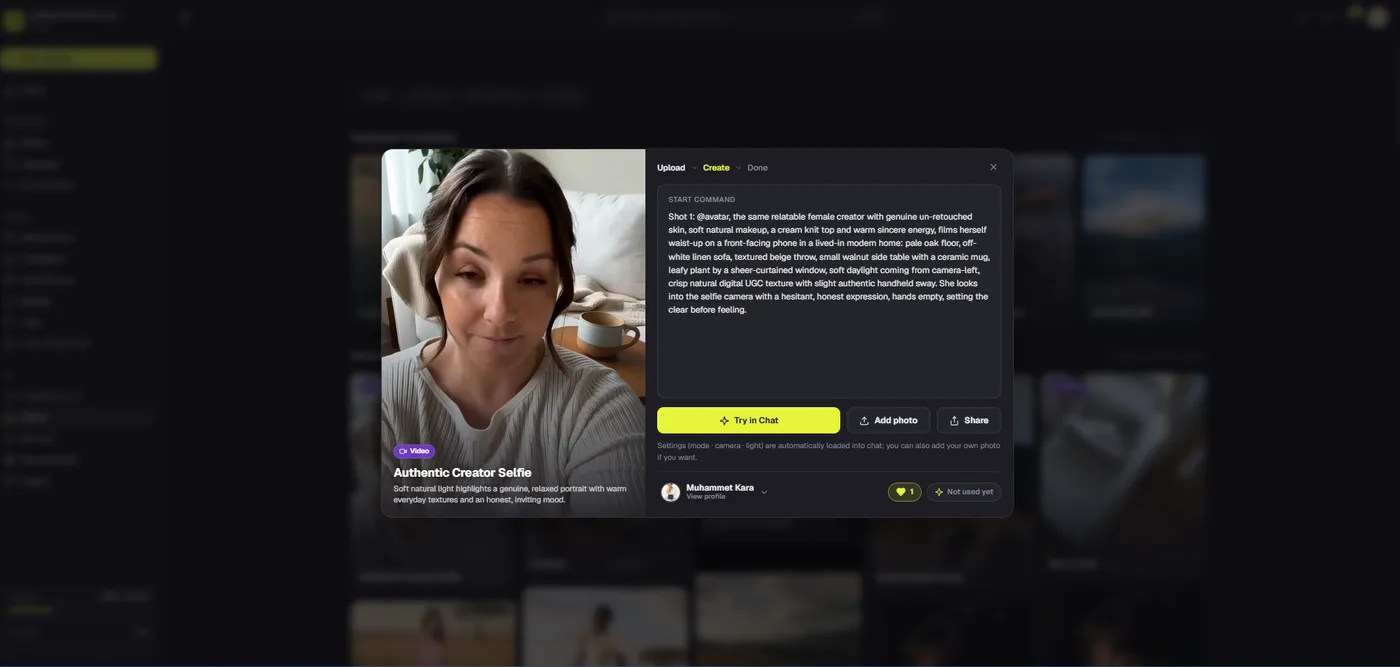
A talking-avatar clip introduces another risk: lips that do not match the narration. Dika Studio’s Marketing Studio can produce ad-style video and applies lip-sync automatically for its talking-avatar scenario. That workflow is different from selecting a lip-sync model in the general video-generation menu. Use the guided scenario when a presenter format is genuinely appropriate, and review the result closely. An apparent match in a tiny preview may fail on a large screen or with a difficult proper noun.
Choose a presenter format because it helps the message, not because it is available. A real screen recording may be the better evidence for software behavior. A product close-up may be stronger for a physical item. If a generated presenter makes a statement about performance, the claim needs the same substantiation as any human spokesperson’s claim. The model does not assume liability for marketing accuracy. Keep a disclosure policy that fits the channels and jurisdictions where the campaign runs.
Localize the meaning, not only the waveform
AI voice tools make multiple language versions tempting. First adapt the script for each audience. Offers, examples, measurements, and product vocabulary may need different wording. A literal translation can be grammatically acceptable yet misleading in context. Assign a speaker or reviewer who understands the market, not only the source language. Confirm pronunciation of the brand and local product names in each target voice.
Changing the spoken language also changes timing. A scene that lasts four seconds in English may need six in another language. Reopen the edit, inspect every cut, and regenerate captions from the final track. Do not overlay a longer translation onto a short scene and speed it up until the words fit. If the product UI is localized, show the matching interface. If it is not, explain what the viewer is seeing rather than implying a language option that does not exist.
Store versions with language, region, channel, and revision in the name. Keep one approved master per market. This makes later price or feature updates manageable. When a claim changes, identify every language version that repeats it. The convenience of AI voice generation is useful only if governance keeps all those files consistent.
Review, export, and measure the right outcome
Before export, ask a reviewer to compare the script, picture, captions, and destination link. Listen to the voiceover without looking at the screen, then watch the video muted. Both passes reveal different gaps. Check the first proof shot, timing of the offer, pronunciation, audio balance, and whether the final call to action matches the actual landing page. Record which version was approved. A file named “final” is not an approval process.
Dika Studio exports the browser edit as MP4. Choose resolution and aspect ratio for the destination, wait for rendering to complete, and open the downloaded file. Check the entire video on a phone and desktop for black frames, missing sound, clipped text, and captions that drift. Upload a test version where practical, because social platforms may crop and compress the file differently from the editor preview. Keep the source project available for a later correction.
Judge the voiceover by comprehension and campaign outcome, not by how human the model sounds. Track whether viewers reach the proof moment, whether support questions reveal confusion, and whether the correct next step is taken. A new voice may be more engaging but less clear; a shorter script may outperform a richer-sounding reading. Test one variable at a time when possible. Voice, script, footage, and offer all influence results.
For the next production, save the approved script and pronunciation notes, not merely the exported audio. Build a reusable checklist for rights, claims, captions, and final file review. That turns each campaign into a better process instead of a pile of disconnected MP4s. Explore Dika Studio’s video workspace, use our subtitle guide for caption checks, or see the Dika home page for our broader digital work.
Frequently asked questions
Does Dika Studio generate AI voices from text?
A dedicated built-in text-to-speech generator is not a current capability we promise. You can import licensed generated audio or record a microphone voiceover and edit it in Studio.
Can I record my own voiceover in Dika Studio?
Yes. The media panel can record microphone audio, and you can place that recording on the video timeline.
Can I import an AI voiceover from another service?
Yes. Use a licensed audio export and import it as media, then align it with footage on a separate track.
Should I use a cloned voice for a product video?
Only with explicit permission and a licence that covers your intended use. Keep consent and usage terms with the campaign record.
How do I make an AI voiceover sound natural?
Write short spoken sentences, test product-name pronunciation, preserve useful pauses, and review the full script against the picture.
Does Dika Studio support lip-sync for talking avatars?
Marketing Studio applies lip-sync automatically in its talking-avatar scenario. Review the finished clip for accuracy and suitability.
Can Dika Studio make subtitles from narration?
Yes. It can transcribe selected clip audio into timed cues on-device. Review every name, number, and claim afterward.
What if my voiceover is longer than the video?
Rewrite or divide the script, then adjust relevant shots. Avoid extreme speed changes or unrelated filler footage.
What should be checked before publishing?
Confirm claim evidence, voice rights, pronunciation, caption accuracy, audio balance, crop, final MP4 playback, and the destination link.
How do I manage several language versions?
Adapt each script for its market, review pronunciation and timing, regenerate captions, and name each approved version clearly.